How To Add Nav Bar To Blogger
Keyzone
12:41 AM
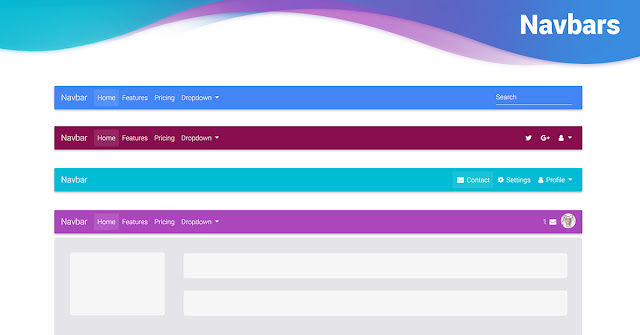
Now Hellobar is common and using by most the bloggers but offers less customization option along with their logo on the bar. So if you're bored with Hellobar let's try our new notification bar. Which offers more customization option than Hellobar, attractive design and there is no logo or watermarks on it.
Excited? You want to add our new notification bar to Blogger? Then follow below steps to add the new notification bar to Blogger.
First of all, go to Blogger >> Select your site >> Template >> Edit HTML. Now you need to search ]]></b:skin> (using+f) tag and add the following CSS code just above it.
#gynotification {
border-bottom:3px solid #ECF1EF;
background:url('https://blogger.googleusercontent.com/img/b/R29vZ2xl/AVvXsEhPaXRS-Iy6NF9kOVfDc2ygIfk2EXcSMnv5-AJ0qf2_o8RTnQJu5Syb7lXXdYQgAbNrZSvrWWC_0_JS8zvag7p3QKMO2_Uji5pv5OsoxKhn3qhqb0wrWhOAEpplhr4j7wbkE98Kn3bB77NF/s1600/Purple+Ribbon+%25282%2529.jpg') repeat-x;
font-size:14px;
font-family: Arial, Helvetica, Sans-serif;
color:#FFF;
padding:10px 0px;
position:fixed;
top:0;
left:0;
z-index:2000;
width:100%;
text-align:center;
height:20px;
}
#gynotification a {
color:#48d3f6;
text-decoration:none;
}
#closebtn {
background:url('https://blogger.googleusercontent.com/img/b/R29vZ2xl/AVvXsEgmzvtM4qtlxNuPuNIoVEDKBUyFxxLCEOmdo1EKcEBam7_mvqYDkg_4itgiZTuFvAKLmqzi6vacPNjjA8z67ahcg8Z1A46_WMdsRRwJ7u0QpsXlzIfQk7XXVz_142RjV9Vch2j6kDBP1_4/s1600/saasass.png') top no-repeat;
border:none;
margin-left:15px;
position:absolute;
cursor:pointer;
}
#gyin {
cursor: pointer;
position: relative;
z-index: 1000;
}
.gynotification #closebtn {
margin-left: 4px;
}
#gybar{
text-decoration: none;
color:#FFFFF;
font-family: arial,sans-serif;
font-size: 13px;
font-weight: bold;
text-shadow: 1px 1px 1px #000;
outline: none;
}
#gybar a:hover{
text-decoration: underline;
}
- To change link color edit #48d3f6
- To change text color edit #FFFFF
Next search for </head> (using+f) and add the following script just above it.
<script src='http://code.jquery.com/jquery-1.5.js'/>
<script src='http://gameryards.googlecode.com/svn/trunk/jquery.easing.1.3.js' type='text/javascript'/>
<script type='text/javascript'>
$(document).ready(function() {
function anim(duration){
$('#gyin').animate(
{height: 'toggle'},
{duration: duration, specialEasing: {height: 'easeOutBounce'}}
);
}
$('#closebtn').click(function() {
$('#gynotification').slideUp();
anim(800);
});
$('#gyin').click(function() {
anim(500);
$('#gynotification').slideDown('slow','easeOutBounce');
});
});
</script>
Now serach for <body> and add the following code below it
<div id='gynotification'>
<div class='gynotification'><div id='gybar'>
<span style='float: center; margin: 3px 0pt 0pt; font-weight: bold;'> NOTIFCATION MESSAGE HERE </span>
<input id='closebtn' type='button'/>
</div></div>
</div>
<div id='gyin' style='display:none;position:fixed;top:-88;right:10px;'>
<img src='https://blogger.googleusercontent.com/img/b/R29vZ2xl/AVvXsEj8VJ8b4X9mg4FeQwMnqKHJR4YDIvkbdUniNqe1cJb1wzogF2fVoHbl8x3gdSDLYftL5d6lXu4x4D27SNqdDPgiACaELrCA_5uZ87kwtZ3937mzCyiZTuQog9pa5CYw8_KH1MCINuFm-NY/s1600/sss.png'/>
<input id='gyin' type='hidden'/>
</div>
To create links in notification bar use following code.
<a class='link' href='ADD-URL-HERE' target='_blank'>Link Text</a>
I hope you like our new Blogger widget.
How To Add Nav Bar To Blogger
 Reviewed by Keyzone
on
12:41 AM
Rating:
Reviewed by Keyzone
on
12:41 AM
Rating:
Reviewed by Keyzone
on
12:41 AM
Rating: