Results for blogging

Paano Gumawa ng Website (How To Make Website)

1:00 AM
Maraming gusto gumawa ng website at isa na ako doon. :) Dati, nong una palang, hinding-hindi din ako marunong gumawa ng website o blog na kagaya mo. Pero dahil sa pagnanasa na talagang gusto ko gumawa, ito na ang naging resulta ng pagnanasa ko - itong binabasa mo at nakikita mo. :) Ngayon, ikaw - marahil kaya't narito upang matutunan din ba kung paano gumawa ng website o blog?

'Wag kang mag-alaala, ibabahagi ko sa'yo ang natutunan ko pero kailangang mayroon kang willingness na matuto. Tanggalin mo muna sa isipan mo na "hindi ako marunong," "baka magkamali ako," "wala akong bakground," at iba pang dahilan na maging hadlang sa gusto mo. Ika nga, isa sa mga pinakamatinding kalaban ng sarili ay ang sarili din... Huh? Totoo po, kalimitan ay sarili natin ay nagbibigay hadlang sa atin kung paano magamit natin ang ating talino at kakayahan - at ang kailangan lang natin ay hubogin ang kakayahang iyon upang mapalago o ma-develop ang ating self-esteem. Kailangan labanan ang mga takot na ating nararamdaman sa ating sarili. Maging Think Positive ika nga.

Ngayon, dadako na po tayo sa pag-gawa ng website o blog. Maraming pwedeng gawaan ng libreng website o blog - tulad ng blogger.com, wordpress.com, wix.com, weebly.com, webs.com at marami pang iba. Ang ituturo ko sayo ay gumawa ng website/blog sa blogger.com.

Sundin lamang ang sumusunod na hakbang:
  • I-click ang nasa kaliwang bahagi ng site ng blogger.com ang "Create New Blog"
  •  
  • Sa "Title", I-type mo ang gusto mong pangalan ng iyong website o blog. Halimbawa po ay Arman Quezon Tutorial Blog.
  • Sa address naman po ay depende rin sa gusto mong ilalagay. Halaimbawa po ay armantutorial at ang maging rsulta non ay armantutorial.blospot.com at yun ang magiging link ng website mo.

  •  Piliin ang "Simple" template at i-click ang "Create blog" na makikita sa ibaba.
  •  Sundin ang step by step na letrato sa ibaba.


  •  Pagaktapos nyong i-click "Page" at makikita nyo ay ganito.
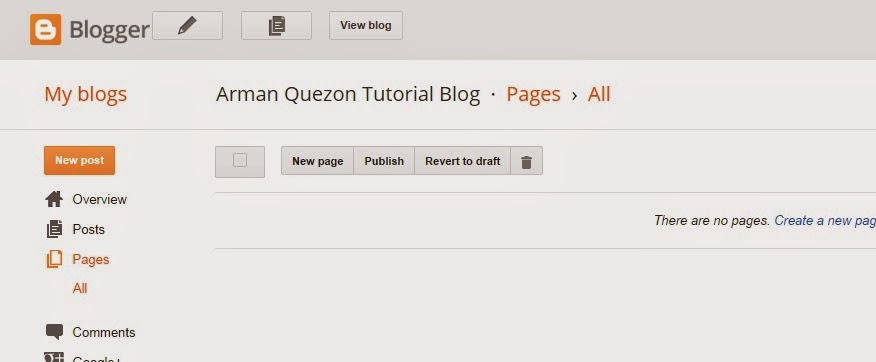
  •  Click nyo po ang "New Page." Ang page po isang pahina ng website o blog tulad halimabawa ay "About Me" "Contact" at iba na gusto mong ilagay (pero click nyo po muna ang ang New page bago kayo makakasulat).
  •  Let's assuming na na-click nyo na ang "New page", halimbawa ang ilalagay natin ay "About Me" pwede ka na magsulat o mag-type sa ibaba ng tungkol sa'yo.
  •  Pagakatapos mong mag-type ng tungkol sa'yo, i-click ang "publish" nasa kanang bahagi ng page na yan.


  •  Pgakatapos mo ma-i-publish, maaari ka pa ring magdadag ng ibang page na gusto mo.

Ngayon naman po ay dadako naman tayo kung paano gumawa ng laman ng ating website o blog. Maaari kang gumawa ng iba't-ibang uri ng gusto mong maging laman ng website mo na maaaring makatulong sa mga mambabasa o tungkol sa iyong karanasan.


  • I-click mo lang yung "New post" upang makapagsulat ka ng nais mong mailalagay sa website mo. Tulad din po ng page sa blog/website.

Para makita mo ang "page" ng website mo, kailangang i-adjust mo yung layout nito. At pwede ring i-hide ang page.


Congrats :) Tapos na ang unang hakbang para website/blog mo. Kung gusto mo bagohin ang template ng website mo, i-click mo lang Temaplate na nasa ibaba ng Layout (nasa kalagitanaan ng tutoryal na 'to).


Paano Gumawa ng Website (How To Make Website) Paano Gumawa ng Website (How To Make Website) Reviewed by Keyzone on 1:00 AM Rating: 5
How To Add Nav Bar To Blogger

12:41 AM

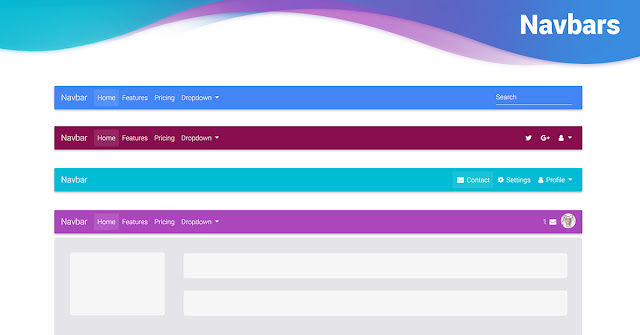
Now Hellobar is common and using by most the bloggers but offers less customization option along with their logo on the bar. So if you're bored with Hellobar let's try our new notification bar. Which offers more customization option than Hellobar, attractive design and there is no logo or watermarks on it.


Excited? You want to add our new notification bar to Blogger? Then follow below steps to add the new notification bar to Blogger.


First of all, go to Blogger >> Select your site >> Template >> Edit HTML. Now you need to search ]]></b:skin> (using+f) tag and add the following CSS code just above it.


#gynotification {
border-bottom:3px solid #ECF1EF;
background:url('https://blogger.googleusercontent.com/img/b/R29vZ2xl/AVvXsEhPaXRS-Iy6NF9kOVfDc2ygIfk2EXcSMnv5-AJ0qf2_o8RTnQJu5Syb7lXXdYQgAbNrZSvrWWC_0_JS8zvag7p3QKMO2_Uji5pv5OsoxKhn3qhqb0wrWhOAEpplhr4j7wbkE98Kn3bB77NF/s1600/Purple+Ribbon+%25282%2529.jpg') repeat-x;
font-size:14px;
font-family: Arial, Helvetica, Sans-serif;
color:#FFF;
padding:10px 0px;
position:fixed;
top:0;
left:0;
z-index:2000;
width:100%;
text-align:center;
height:20px;
}
#gynotification a {
color:#48d3f6;
text-decoration:none;
}
#closebtn {
background:url('https://blogger.googleusercontent.com/img/b/R29vZ2xl/AVvXsEgmzvtM4qtlxNuPuNIoVEDKBUyFxxLCEOmdo1EKcEBam7_mvqYDkg_4itgiZTuFvAKLmqzi6vacPNjjA8z67ahcg8Z1A46_WMdsRRwJ7u0QpsXlzIfQk7XXVz_142RjV9Vch2j6kDBP1_4/s1600/saasass.png') top no-repeat;
border:none;
margin-left:15px;
position:absolute;
cursor:pointer;
}
#gyin {
cursor: pointer;
position: relative;
z-index: 1000;
}
.gynotification #closebtn {
margin-left: 4px;
}
#gybar{
text-decoration: none;
color:#FFFFF;
font-family: arial,sans-serif;
font-size: 13px;
font-weight: bold;
text-shadow: 1px 1px 1px #000;
outline: none;
}
#gybar a:hover{
text-decoration: underline;
}


  • To change link color edit #48d3f6
  • To change text color edit #FFFFF

Next search for </head> (using+f) and add the following script just above it.


<script src='http://code.jquery.com/jquery-1.5.js'/>
<script src='http://gameryards.googlecode.com/svn/trunk/jquery.easing.1.3.js' type='text/javascript'/>
<script type='text/javascript'>
$(document).ready(function() {
    function anim(duration){
    $(&#39;#gyin&#39;).animate(
            {height: &#39;toggle&#39;},
            {duration: duration, specialEasing: {height: &#39;easeOutBounce&#39;}}
        );
    }

    $(&#39;#closebtn&#39;).click(function() {
        $(&#39;#gynotification&#39;).slideUp();
        anim(800);
    });

    $(&#39;#gyin&#39;).click(function() {
        anim(500);
        $(&#39;#gynotification&#39;).slideDown(&#39;slow&#39;,&#39;easeOutBounce&#39;);
    });
});
</script>


Now serach for <body> and add the following code below it


<div id='gynotification'>
        <div class='gynotification'><div id='gybar'>
<span style='float: center; margin: 3px 0pt 0pt; font-weight: bold;'> NOTIFCATION MESSAGE HERE </span>
<input id='closebtn' type='button'/>
</div></div>
</div>
<div id='gyin' style='display:none;position:fixed;top:-88;right:10px;'>
<img src='https://blogger.googleusercontent.com/img/b/R29vZ2xl/AVvXsEj8VJ8b4X9mg4FeQwMnqKHJR4YDIvkbdUniNqe1cJb1wzogF2fVoHbl8x3gdSDLYftL5d6lXu4x4D27SNqdDPgiACaELrCA_5uZ87kwtZ3937mzCyiZTuQog9pa5CYw8_KH1MCINuFm-NY/s1600/sss.png'/>
<input id='gyin' type='hidden'/>
</div>


To create links in notification bar use following code.


<a class='link' href='ADD-URL-HERE' target='_blank'>Link Text</a>


I hope you like our new Blogger widget.

How To Add Nav Bar To Blogger How To Add Nav Bar To Blogger Reviewed by Keyzone on 12:41 AM Rating: 5

How To Make Pop Up To Blogger

1:10 AM

Today I'm Going To Share With You A New Great Stylish Popup Auto-Responder Form Box Widget For Blogger. Now You Can Get Prospects For Your Business And Drive Social Media Traffic Also To Your Website/Blog. It is Very Simple Way To Get it And You Don't Need To Know Any Language of Web Just Follow Our Steps For This. It is Very Helpful To You


Just Follow Our Steps Carefully And Enjoy Our Tutorial. You Can Also Read Our Last Article About :

Just Follow This Steps:
  •  Sign up to any of the following site:
  1. www.getresponse.com
  2. www.aweber.com 
  3. www.listwire.com
  4. www.sendfree.com
  5. www.simplycast.com
  • Create your own web-form
  • Create auto responder message
After completed the auto-responder, 
  • Go To Blogger Dashboard
  • Layout >> Add New HTML Widget 
  • Past Below Code In It And Click on Save

<!-------ArmanQuezon.blogspot.com beautiful blogger popup box ends------------> <style type="text/css"> * html

    #ArmanQuezonstylepopupdiv { position:absolute; overflow:hidden;} #ArmmanQuezonstylepopupdiv { display:block; top:0px;
    left:0px; width:100%; height:100%; position:fixed; background-color:none; margin:0; overflow-y:hidden;}
    #ArmanQuezonstylepopup { background-color: #fff; overflow:none; overflow:hidden;} .ArmanQuezonstylepopup { width:390px;
    overflow:hidden; height:430px; position:fixed; top:45%; left:50%; margin-top:-210px; margin-left:-200px; border: 10px solid
    #999; padding: 20px;} </style> <!--[if lte IE 6]> <style type="text/css"> /*<![CDATA[*/ html {overflow-x:auto; overflow-
y:hidden;} /*]]>*/ </style> <![endif]--> <br />
<div id="ArmanQuezonstylepopupdiv">
<div class="ArmstonryQuezonstylepopup" id="ArmanQuezonstylepopup">
<center>
 <h3 class="title">
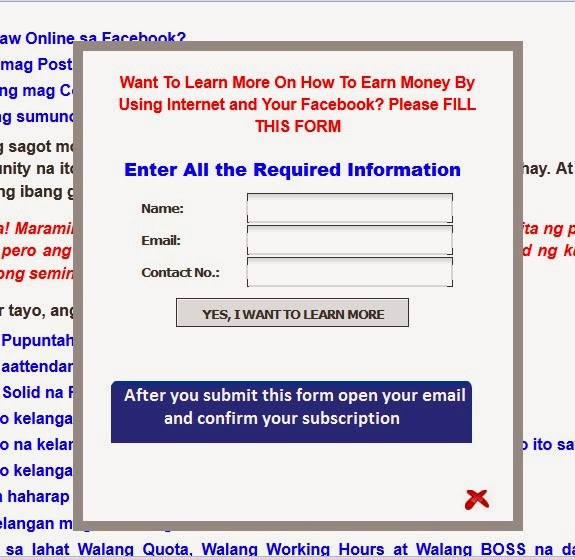
 <span style="color: red;">Want To Learn More On How To Earn Money By Using Internet and Your Facebook? Please FILL THIS FORM </span></h3>
</center>

<span style="font-family: 'arial black', 'avant garde';"><b>

put here your HTML ListWire Web Form
<br />
<br />
<!-- Please don't remove credit --><span style="font-size:xx-small; color:#000; text-decoration:none;">Get this gadget at</span> <a target='_blank' style="font-size:xx-small; color:#3B78CD; text-decoration:none;" href="http://armanquezon.blogspot.com/2014/03/how-to-make-pop-up-to-blogger.html">ArmanQuezon.Blogspot.com</a>
<br />
<colorscheme=light&amp;></colorscheme=light&amp;></div></td></tr></tbody></table></b></span> <div style=" float:right; margin-left:0px; font-size:9px; cursor:pointer;" >
<a style=" font-size:9px; color:#3B78CD; text-decoration:none;" onmouseup="document.getElementById
('ArmanQuezonstylepopupdiv') .style.display='none'"> <img src="https://lh6.googleusercontent.com/-BTm-WAqkztI/Ua9pgU-
16fI/AAAAAAAABEs/valx8qUqNV4/h120/exit.png"/> </a> </div> </div> </div>
 <!-------ArmanQuezon.blogspot.com beautiful blogger popup box ends------------>


Just replace the color blue with your HTML ListWire Autoresponder and Enjoy Our Tutorial Please Like Us And Follow Us On Google+ And Subscribe Also.

If You Get Problem With It our Can't understand Our Process Then Comment Here Without Tension And Enjoy Our Blog Article.


How To Make Pop Up To Blogger How To Make Pop Up To Blogger Reviewed by Keyzone on 1:10 AM Rating: 5

How To Work Less and Make More Money

4:43 PM

Let me ask you a Question: How is it that some people earn fabulous sums of money working only part time or even less, while most people spend more than a third of their time working and still barely have enough to scrape by???

Do you know the answer to this? Well if you do, CONGRATULATIONS! Understanding how other people build wealth and financial freedom will give you the power to do the same, if you choose.


The answer to the question is that the people who earn more money in less time understand the power of leveraged incomes! People all throughout history have found ways to leveraged their time and efforts so that they earn massive amounts of money WITH VERY LITTLE EFFORT.

One of the most basic and common ways to leverage ones income is by owning a business. Have you ever wondered why business owners are among the wealthiest people while it is the employees who do all of the work?

If You Are an Employee, You Are Trading Your TIME FOR MONEY. This is obviously fine for earning a living, but it is not ok for anyone who wants to build wealth. Why? Because in order to build wealth you cannot have a limit on your income, but anytime you trade your time to earn a paycheck, you are greatly limiting your earning potential.

But business owners are not limited because they understand the power of leveraged income. They know that in order to earn a massive amount of money, they need to increase their leverage. They do this by utilizing employees to bring money into the business while paying them less than the value that they create.

There are other ways to leverage yourself so that you earn money is a much more effective fashion. Network marketing is great examples. Everyone knows that network marketers can earn six or even seven figure incomes yearly, and the answer is LEVERAGE.

You can also leverage your income by using new technology. For example, the internet has created many new vehicles for wealth. My favorite way to leverage my income online is to create websites that generate profits.

Making your own website, in my humble opinion, is better than having an employee because websites never sleep, they never get tired, and they can work and earn money for your around the clock. With a profitable website, you can earn more with little or no work. That is what I call leverage!!

But no matter what path you take, just remember that the power of leveraged incomes can give you the power to rise above the mediocrity that most people experience throughout their lives. Find ways to leverage your time, effort, and income so that you can enjoy earning huge sums of money and still have plenty of time and energy to live life to the fullest.
How To Work Less and Make More Money How To Work Less and Make More Money Reviewed by Keyzone on 4:43 PM Rating: 5

Who and What is a Leader?

4:14 PM

A Leader is one who can inspire others into action. An Individual who can learn from one with proven leadership, and see the value of it, can pass that knowledge on to others effectively. A LEADER:

1) Uses and enjoys your company products regularly.

2) Maintains and Develops an ever growing base of retail Customers.

3) Knows the Product Line.

4) Understands the Marketing Plan.

5) Maintains an active Prospect List.

6) Trains his DOWNLINE properly.

7) Promotes and Attends business building functions.

8) Maintains a high level of communication.

9) Attends and Gives regular business presentations.

10) Dresses properly for all business functions and is punctual.

11) Stays in frequent contact with UP-LINE Leaders.

12) Continues working to improve his/her skills.

13) Sets a dynamic example for others.

14) Is well organized, plans ahead.

15) Has a systematic plan, follows it.

16) Helps others develop Leadership skills.

A real Leader’s primary obligation to his/her group is to succeed! They do this by setting a dynamic example through their own work ethic and team spirit.

You can encourage this essential element by helping your DOWNLINE Affiliates develop their own leadership qualities. A good way to do this is by delegating certain responsibilities to them, so they won’t come to depend on you for everything. You want your eagles to soar as quickly as possible.
Who and What is a Leader? Who and What is a Leader? Reviewed by Keyzone on 4:14 PM Rating: 5
Powered by Blogger.